> ## Documentation Index
> Fetch the complete documentation index at: https://docs-dev-eval-flywheel-swift-quickstart.mintlify.site/llms.txt
> Use this file to discover all available pages before exploring further.

> Configure an update policy form using Forms for Actions

# Use Cases: Configure an update policy form using Forms

<Card title="Before you start">
  1. Create a [Machine-to-Machine Application](/docs/get-started/auth0-overview/create-applications/machine-to-machine-apps) with the following scopes enabled:

  * `read:users`
  * `update:users`
  * `create:users`
  * `read:users_app_metadata`
  * `update:users_app_metadata`
  * `create:users_app_metadata`

  2. Add a [Vault connection](/docs/customize/forms/vault) using the M2M application credentials.
</Card>

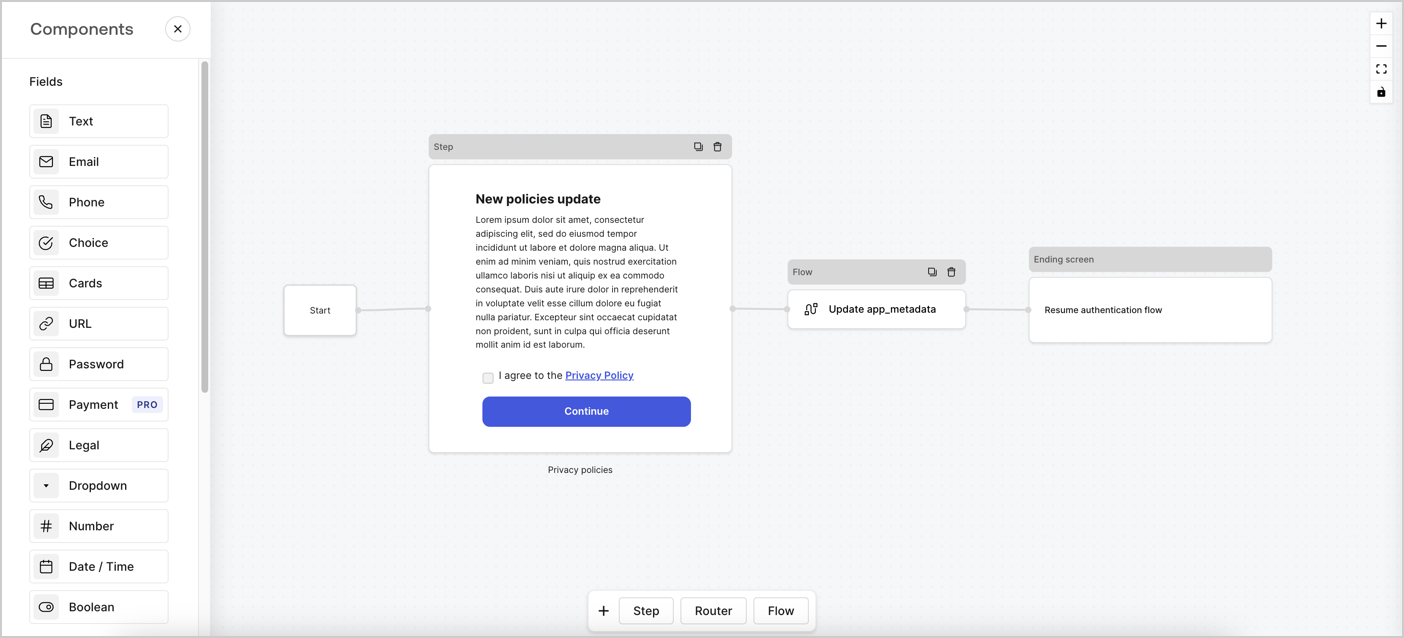
Forms for Actions allows you to create custom privacy policies flows and store the consent under the `app_metadata` object.
<Frame>
  <img src="https://mintcdn.com/docs-dev-eval-flywheel-swift-quickstart/OXWg66klgaRKrINu/docs/images/cdy7uua7fh8z/6i68dMvHDTijfRmSgN1x8Q/ad900e7d4c0fb34645921435472b8684/privavy-policy-form.png?fit=max&auto=format&n=OXWg66klgaRKrINu&q=85&s=7d59d1d09b5f6e9da813c81297e4c021" alt="Dashboard > Actions > Forms > Privacy policy use case" data-og-width="1404" width="1404" data-og-height="638" height="638" data-path="docs/images/cdy7uua7fh8z/6i68dMvHDTijfRmSgN1x8Q/ad900e7d4c0fb34645921435472b8684/privavy-policy-form.png" data-optimize="true" data-opv="3" srcset="https://mintcdn.com/docs-dev-eval-flywheel-swift-quickstart/OXWg66klgaRKrINu/docs/images/cdy7uua7fh8z/6i68dMvHDTijfRmSgN1x8Q/ad900e7d4c0fb34645921435472b8684/privavy-policy-form.png?w=280&fit=max&auto=format&n=OXWg66klgaRKrINu&q=85&s=5ceaf6ac119461c3e766ffa12e91f03b 280w, https://mintcdn.com/docs-dev-eval-flywheel-swift-quickstart/OXWg66klgaRKrINu/docs/images/cdy7uua7fh8z/6i68dMvHDTijfRmSgN1x8Q/ad900e7d4c0fb34645921435472b8684/privavy-policy-form.png?w=560&fit=max&auto=format&n=OXWg66klgaRKrINu&q=85&s=8850b089042577c8c7258386ca4933a5 560w, https://mintcdn.com/docs-dev-eval-flywheel-swift-quickstart/OXWg66klgaRKrINu/docs/images/cdy7uua7fh8z/6i68dMvHDTijfRmSgN1x8Q/ad900e7d4c0fb34645921435472b8684/privavy-policy-form.png?w=840&fit=max&auto=format&n=OXWg66klgaRKrINu&q=85&s=d359f648854184febe043ee0f3f9a09c 840w, https://mintcdn.com/docs-dev-eval-flywheel-swift-quickstart/OXWg66klgaRKrINu/docs/images/cdy7uua7fh8z/6i68dMvHDTijfRmSgN1x8Q/ad900e7d4c0fb34645921435472b8684/privavy-policy-form.png?w=1100&fit=max&auto=format&n=OXWg66klgaRKrINu&q=85&s=8856a47f731fb1887eef7ddc79e3beb2 1100w, https://mintcdn.com/docs-dev-eval-flywheel-swift-quickstart/OXWg66klgaRKrINu/docs/images/cdy7uua7fh8z/6i68dMvHDTijfRmSgN1x8Q/ad900e7d4c0fb34645921435472b8684/privavy-policy-form.png?w=1650&fit=max&auto=format&n=OXWg66klgaRKrINu&q=85&s=5519eed20641c9d423d7eca59704fc48 1650w, https://mintcdn.com/docs-dev-eval-flywheel-swift-quickstart/OXWg66klgaRKrINu/docs/images/cdy7uua7fh8z/6i68dMvHDTijfRmSgN1x8Q/ad900e7d4c0fb34645921435472b8684/privavy-policy-form.png?w=2500&fit=max&auto=format&n=OXWg66klgaRKrINu&q=85&s=cfd18f2a0c0c568cb496472ca6b07fc6 2500w" />
</Frame>

The sections below outline how you can create an Update Policy form using nodes and flows, along with steps for adding your form to a [Post Login](/docs/customize/actions/explore-triggers/signup-and-login-triggers/login-trigger) Action.

## Create a form from scratch

Follow these steps to create a form to gather information:

1. Open the Form editor by selecting **Auth0 Dashboard > Actions > Forms.**
2. Select **Create Form** > **Start from scratch**.

By default, a new form contains a Start node, a Step node, and an Ending screen node.

<Frame>
  <img src="https://mintcdn.com/docs-dev-eval-flywheel-swift-quickstart/v155VB2LhicGFI_L/docs/images/cdy7uua7fh8z/2TZ9jSjgEcARFpULI6hz4R/a4319a1bd482f2ee5cc23100fdb2f42c/New-form-Forms-for-action-use-case.png?fit=max&auto=format&n=v155VB2LhicGFI_L&q=85&s=03c3de9e5e39f7dac48c0fa5fbb47c95" alt="Dashboard > Forms > Use Cases > Form" data-og-width="1234" width="1234" data-og-height="371" height="371" data-path="docs/images/cdy7uua7fh8z/2TZ9jSjgEcARFpULI6hz4R/a4319a1bd482f2ee5cc23100fdb2f42c/New-form-Forms-for-action-use-case.png" data-optimize="true" data-opv="3" srcset="https://mintcdn.com/docs-dev-eval-flywheel-swift-quickstart/v155VB2LhicGFI_L/docs/images/cdy7uua7fh8z/2TZ9jSjgEcARFpULI6hz4R/a4319a1bd482f2ee5cc23100fdb2f42c/New-form-Forms-for-action-use-case.png?w=280&fit=max&auto=format&n=v155VB2LhicGFI_L&q=85&s=35a8c0f40fa968037b580752e6b8c5d7 280w, https://mintcdn.com/docs-dev-eval-flywheel-swift-quickstart/v155VB2LhicGFI_L/docs/images/cdy7uua7fh8z/2TZ9jSjgEcARFpULI6hz4R/a4319a1bd482f2ee5cc23100fdb2f42c/New-form-Forms-for-action-use-case.png?w=560&fit=max&auto=format&n=v155VB2LhicGFI_L&q=85&s=5d666186c3b179e13ab5f880350d9bbc 560w, https://mintcdn.com/docs-dev-eval-flywheel-swift-quickstart/v155VB2LhicGFI_L/docs/images/cdy7uua7fh8z/2TZ9jSjgEcARFpULI6hz4R/a4319a1bd482f2ee5cc23100fdb2f42c/New-form-Forms-for-action-use-case.png?w=840&fit=max&auto=format&n=v155VB2LhicGFI_L&q=85&s=4af3003b7b6ed5dd0592735916480d41 840w, https://mintcdn.com/docs-dev-eval-flywheel-swift-quickstart/v155VB2LhicGFI_L/docs/images/cdy7uua7fh8z/2TZ9jSjgEcARFpULI6hz4R/a4319a1bd482f2ee5cc23100fdb2f42c/New-form-Forms-for-action-use-case.png?w=1100&fit=max&auto=format&n=v155VB2LhicGFI_L&q=85&s=11488404ec9851f1927e8c0206bb4b16 1100w, https://mintcdn.com/docs-dev-eval-flywheel-swift-quickstart/v155VB2LhicGFI_L/docs/images/cdy7uua7fh8z/2TZ9jSjgEcARFpULI6hz4R/a4319a1bd482f2ee5cc23100fdb2f42c/New-form-Forms-for-action-use-case.png?w=1650&fit=max&auto=format&n=v155VB2LhicGFI_L&q=85&s=80fc15823133e2951d09377e20504d37 1650w, https://mintcdn.com/docs-dev-eval-flywheel-swift-quickstart/v155VB2LhicGFI_L/docs/images/cdy7uua7fh8z/2TZ9jSjgEcARFpULI6hz4R/a4319a1bd482f2ee5cc23100fdb2f42c/New-form-Forms-for-action-use-case.png?w=2500&fit=max&auto=format&n=v155VB2LhicGFI_L&q=85&s=fde5381069c7ad146e408e75184b4779 2500w" />
</Frame>

### Configure the Step node

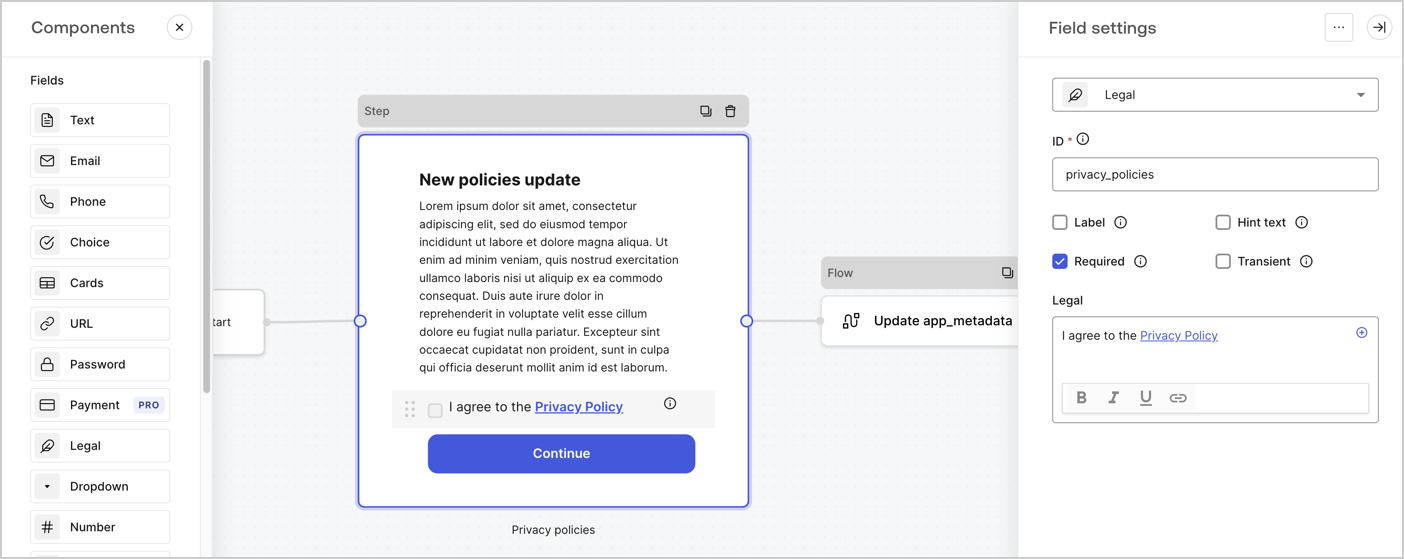
The Step node is the graphical interface visible to users. Add [Fields](/docs/customize/forms/nodes-and-components) to the Step node to collect the new agreement acceptance value by following these steps:

1. Drag a **Rich text** field from the **Components menu** into the **Step** node.

   * **Rich text**: Enter a description of your privacy policies updates.
   * Select **Save**.
2. Drag a **Legal** field into the **Step** node.

   * **ID**: Enter `privacy_policies`.
   * **Required**: Enable the checkbox.
   * **Legal**: Enter `I agree to the Privacy Policy`.
   * Select **Save**.
3. Select **Publish** to save.
<Frame>
  <img src="https://mintcdn.com/docs-dev-eval-flywheel-swift-quickstart/qLyzRQwqNTTq8aqx/docs/images/cdy7uua7fh8z/59zFFjQjAnjogkc2QGIqqJ/0ad66b1b636544122aa4e65968b76c2c/privacy-policy-step-node.png?fit=max&auto=format&n=qLyzRQwqNTTq8aqx&q=85&s=8d918d48169affc87a2baff08e1f0ba3" alt="Dashboard > Actions > Forms > Use case privacy policy step node" data-og-width="1404" width="1404" data-og-height="559" height="559" data-path="docs/images/cdy7uua7fh8z/59zFFjQjAnjogkc2QGIqqJ/0ad66b1b636544122aa4e65968b76c2c/privacy-policy-step-node.png" data-optimize="true" data-opv="3" srcset="https://mintcdn.com/docs-dev-eval-flywheel-swift-quickstart/qLyzRQwqNTTq8aqx/docs/images/cdy7uua7fh8z/59zFFjQjAnjogkc2QGIqqJ/0ad66b1b636544122aa4e65968b76c2c/privacy-policy-step-node.png?w=280&fit=max&auto=format&n=qLyzRQwqNTTq8aqx&q=85&s=eaaa99b9fe7f025ae8f3bf8fc10b4475 280w, https://mintcdn.com/docs-dev-eval-flywheel-swift-quickstart/qLyzRQwqNTTq8aqx/docs/images/cdy7uua7fh8z/59zFFjQjAnjogkc2QGIqqJ/0ad66b1b636544122aa4e65968b76c2c/privacy-policy-step-node.png?w=560&fit=max&auto=format&n=qLyzRQwqNTTq8aqx&q=85&s=49ec93062768742cfba2a5831870851c 560w, https://mintcdn.com/docs-dev-eval-flywheel-swift-quickstart/qLyzRQwqNTTq8aqx/docs/images/cdy7uua7fh8z/59zFFjQjAnjogkc2QGIqqJ/0ad66b1b636544122aa4e65968b76c2c/privacy-policy-step-node.png?w=840&fit=max&auto=format&n=qLyzRQwqNTTq8aqx&q=85&s=d6cfbdf38d17af00549838582f42f287 840w, https://mintcdn.com/docs-dev-eval-flywheel-swift-quickstart/qLyzRQwqNTTq8aqx/docs/images/cdy7uua7fh8z/59zFFjQjAnjogkc2QGIqqJ/0ad66b1b636544122aa4e65968b76c2c/privacy-policy-step-node.png?w=1100&fit=max&auto=format&n=qLyzRQwqNTTq8aqx&q=85&s=c40d8b086c9bb73d7cd51f3d378a489f 1100w, https://mintcdn.com/docs-dev-eval-flywheel-swift-quickstart/qLyzRQwqNTTq8aqx/docs/images/cdy7uua7fh8z/59zFFjQjAnjogkc2QGIqqJ/0ad66b1b636544122aa4e65968b76c2c/privacy-policy-step-node.png?w=1650&fit=max&auto=format&n=qLyzRQwqNTTq8aqx&q=85&s=57540ef253889c5fe8202f936688e8b8 1650w, https://mintcdn.com/docs-dev-eval-flywheel-swift-quickstart/qLyzRQwqNTTq8aqx/docs/images/cdy7uua7fh8z/59zFFjQjAnjogkc2QGIqqJ/0ad66b1b636544122aa4e65968b76c2c/privacy-policy-step-node.png?w=2500&fit=max&auto=format&n=qLyzRQwqNTTq8aqx&q=85&s=1dbc8733d6d735ea1837e48ad10ed959 2500w" />
</Frame>

### Configure the Flow node

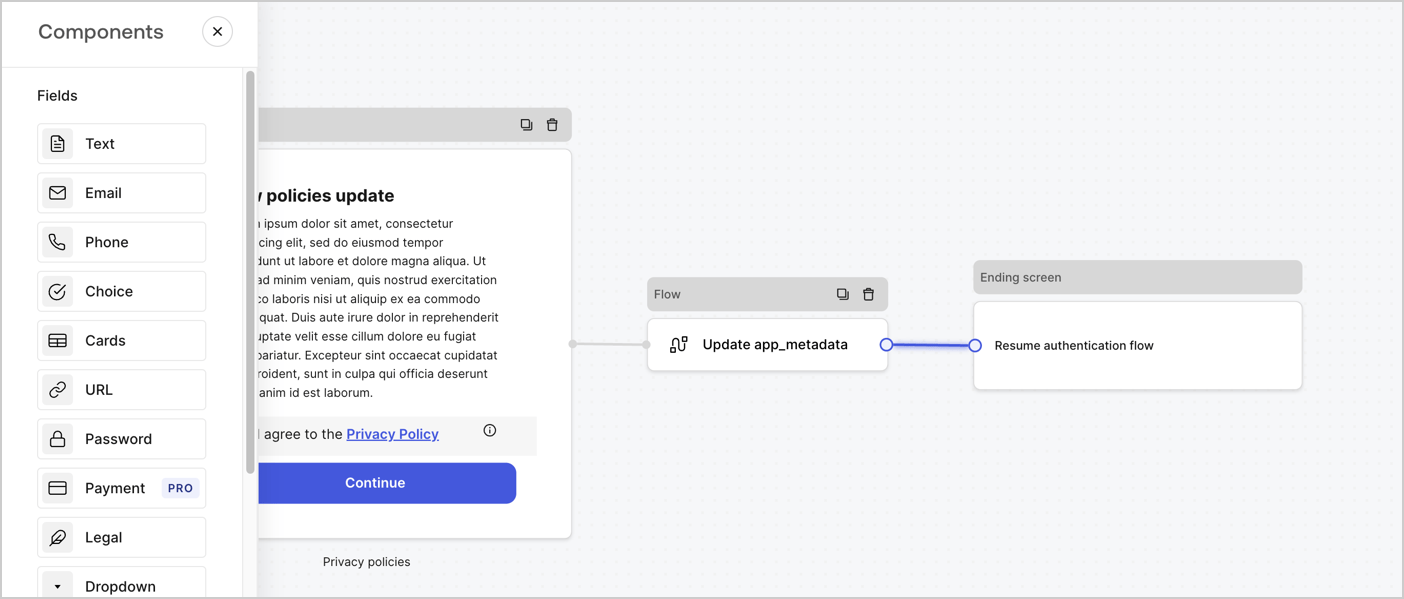
Add a **Flow** node after the **Step** node to update the `app_metadata` and resume the authentication flow by following these steps:

1. Select **Flow** from the bottom of the Form editor.
2. Remove the existing link between the **Step** and **Ending Screen** nodes.
3. Select the new **Flow** > **Click to add a flow** > **Create a new flow.**

   * Enter `Update app_metadata` in the **Name** field.
   * Select **Create**.
   * Select **Save**.
4. Link the **Flow** node to the **Step** and **Ending Screen** nodes as pictured below.
5. Select **Publish** to save.
<Frame>
  <img src="https://mintcdn.com/docs-dev-eval-flywheel-swift-quickstart/OXWg66klgaRKrINu/docs/images/cdy7uua7fh8z/6YIkzm7SrpM9LW76AXuRzh/353c518fe82bbaa440836da1d83596d6/link-policies.png?fit=max&auto=format&n=OXWg66klgaRKrINu&q=85&s=dd597edfe0bbd199cb228ff8c7d3d76c" alt="Dashboard > Actions > Forms > Form" data-og-width="1404" width="1404" data-og-height="599" height="599" data-path="docs/images/cdy7uua7fh8z/6YIkzm7SrpM9LW76AXuRzh/353c518fe82bbaa440836da1d83596d6/link-policies.png" data-optimize="true" data-opv="3" srcset="https://mintcdn.com/docs-dev-eval-flywheel-swift-quickstart/OXWg66klgaRKrINu/docs/images/cdy7uua7fh8z/6YIkzm7SrpM9LW76AXuRzh/353c518fe82bbaa440836da1d83596d6/link-policies.png?w=280&fit=max&auto=format&n=OXWg66klgaRKrINu&q=85&s=99ee91a75d3904dc6139d24d51f0e2f3 280w, https://mintcdn.com/docs-dev-eval-flywheel-swift-quickstart/OXWg66klgaRKrINu/docs/images/cdy7uua7fh8z/6YIkzm7SrpM9LW76AXuRzh/353c518fe82bbaa440836da1d83596d6/link-policies.png?w=560&fit=max&auto=format&n=OXWg66klgaRKrINu&q=85&s=9f432f43fe28888256941b2607752f12 560w, https://mintcdn.com/docs-dev-eval-flywheel-swift-quickstart/OXWg66klgaRKrINu/docs/images/cdy7uua7fh8z/6YIkzm7SrpM9LW76AXuRzh/353c518fe82bbaa440836da1d83596d6/link-policies.png?w=840&fit=max&auto=format&n=OXWg66klgaRKrINu&q=85&s=50ce82b2148296678f829b2d4b79f280 840w, https://mintcdn.com/docs-dev-eval-flywheel-swift-quickstart/OXWg66klgaRKrINu/docs/images/cdy7uua7fh8z/6YIkzm7SrpM9LW76AXuRzh/353c518fe82bbaa440836da1d83596d6/link-policies.png?w=1100&fit=max&auto=format&n=OXWg66klgaRKrINu&q=85&s=a7506ef6dfdc5c31a290489769a6f013 1100w, https://mintcdn.com/docs-dev-eval-flywheel-swift-quickstart/OXWg66klgaRKrINu/docs/images/cdy7uua7fh8z/6YIkzm7SrpM9LW76AXuRzh/353c518fe82bbaa440836da1d83596d6/link-policies.png?w=1650&fit=max&auto=format&n=OXWg66klgaRKrINu&q=85&s=a1678f6db23b45a4312ee5c4853c4d87 1650w, https://mintcdn.com/docs-dev-eval-flywheel-swift-quickstart/OXWg66klgaRKrINu/docs/images/cdy7uua7fh8z/6YIkzm7SrpM9LW76AXuRzh/353c518fe82bbaa440836da1d83596d6/link-policies.png?w=2500&fit=max&auto=format&n=OXWg66klgaRKrINu&q=85&s=2a53ab299814fa7ac094810102827aa4 2500w" />
</Frame>

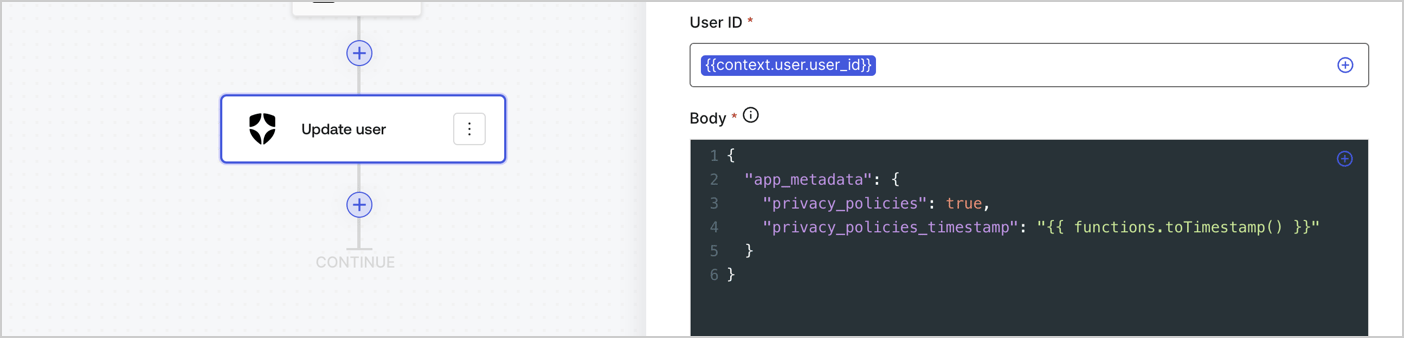
Add an Auth0 Update user action to the flow by following these steps:

1. Select the **Flow** **Update app\_metadata** > **Edit flow** to open the Flow editor in a new tab.
2. Below the StartAction, select the **+** icon to add an **Update user** action. Complete the fields below, then select **Save** to continue.

   * **Connection**: Select from the dropdown the Vault connection to your M2M application.

   * **User ID**: Enter `{{context.user.user_id}}`.

   * **Body**: Copy and paste the following code to update the app\_metadata with the privacy\_policies and privacy\_policies\_timestamp properties.

     ```text lines theme={null}
     {
       "app_metadata": {
         "privacy_policies": true,
         "privacy_policies_timestamp": "{{ functions.toTimestamp() }}"
       }
     }
     ```

   * Select **Save**.
3. Select **Publish** to save.
<Frame>
  <img src="https://mintcdn.com/docs-dev-eval-flywheel-swift-quickstart/54TCmeoCJVAyAfJ_/docs/images/cdy7uua7fh8z/CvMNIwWrOUwaFW4X3G28p/1fb70ae57a20749d9ffaaba8dc0b7e26/update-user-privacy.png?fit=max&auto=format&n=54TCmeoCJVAyAfJ_&q=85&s=00d98bb3856fb9ea6cb03b09fc0b1598" alt="Dashboard > Actions > Forms > User case privacy policy code" data-og-width="1404" width="1404" data-og-height="338" height="338" data-path="docs/images/cdy7uua7fh8z/CvMNIwWrOUwaFW4X3G28p/1fb70ae57a20749d9ffaaba8dc0b7e26/update-user-privacy.png" data-optimize="true" data-opv="3" srcset="https://mintcdn.com/docs-dev-eval-flywheel-swift-quickstart/54TCmeoCJVAyAfJ_/docs/images/cdy7uua7fh8z/CvMNIwWrOUwaFW4X3G28p/1fb70ae57a20749d9ffaaba8dc0b7e26/update-user-privacy.png?w=280&fit=max&auto=format&n=54TCmeoCJVAyAfJ_&q=85&s=e97a02e37959417f2bb96a9919567b07 280w, https://mintcdn.com/docs-dev-eval-flywheel-swift-quickstart/54TCmeoCJVAyAfJ_/docs/images/cdy7uua7fh8z/CvMNIwWrOUwaFW4X3G28p/1fb70ae57a20749d9ffaaba8dc0b7e26/update-user-privacy.png?w=560&fit=max&auto=format&n=54TCmeoCJVAyAfJ_&q=85&s=dcadecbed318a325f599f9eca2bab70c 560w, https://mintcdn.com/docs-dev-eval-flywheel-swift-quickstart/54TCmeoCJVAyAfJ_/docs/images/cdy7uua7fh8z/CvMNIwWrOUwaFW4X3G28p/1fb70ae57a20749d9ffaaba8dc0b7e26/update-user-privacy.png?w=840&fit=max&auto=format&n=54TCmeoCJVAyAfJ_&q=85&s=8c10b7f0564a5cfa85f9ab6230148e07 840w, https://mintcdn.com/docs-dev-eval-flywheel-swift-quickstart/54TCmeoCJVAyAfJ_/docs/images/cdy7uua7fh8z/CvMNIwWrOUwaFW4X3G28p/1fb70ae57a20749d9ffaaba8dc0b7e26/update-user-privacy.png?w=1100&fit=max&auto=format&n=54TCmeoCJVAyAfJ_&q=85&s=a776e66b4bd068001576fefe10d749ba 1100w, https://mintcdn.com/docs-dev-eval-flywheel-swift-quickstart/54TCmeoCJVAyAfJ_/docs/images/cdy7uua7fh8z/CvMNIwWrOUwaFW4X3G28p/1fb70ae57a20749d9ffaaba8dc0b7e26/update-user-privacy.png?w=1650&fit=max&auto=format&n=54TCmeoCJVAyAfJ_&q=85&s=4e25f0b474310ec1bba605238fb3e40e 1650w, https://mintcdn.com/docs-dev-eval-flywheel-swift-quickstart/54TCmeoCJVAyAfJ_/docs/images/cdy7uua7fh8z/CvMNIwWrOUwaFW4X3G28p/1fb70ae57a20749d9ffaaba8dc0b7e26/update-user-privacy.png?w=2500&fit=max&auto=format&n=54TCmeoCJVAyAfJ_&q=85&s=7fe6494fe0b9caf71f7fb23182ead6b0 2500w" />
</Frame>

<Callout icon="file-lines" color="#0EA5E9" iconType="regular">
  The flow **Update app\_metadata** adds a `privacy_policies true` value to the app`_metadata` object and also generates a timestamp with a [helper function.](/docs/customize/forms/variables)
</Callout>

## Retrieve the form render code

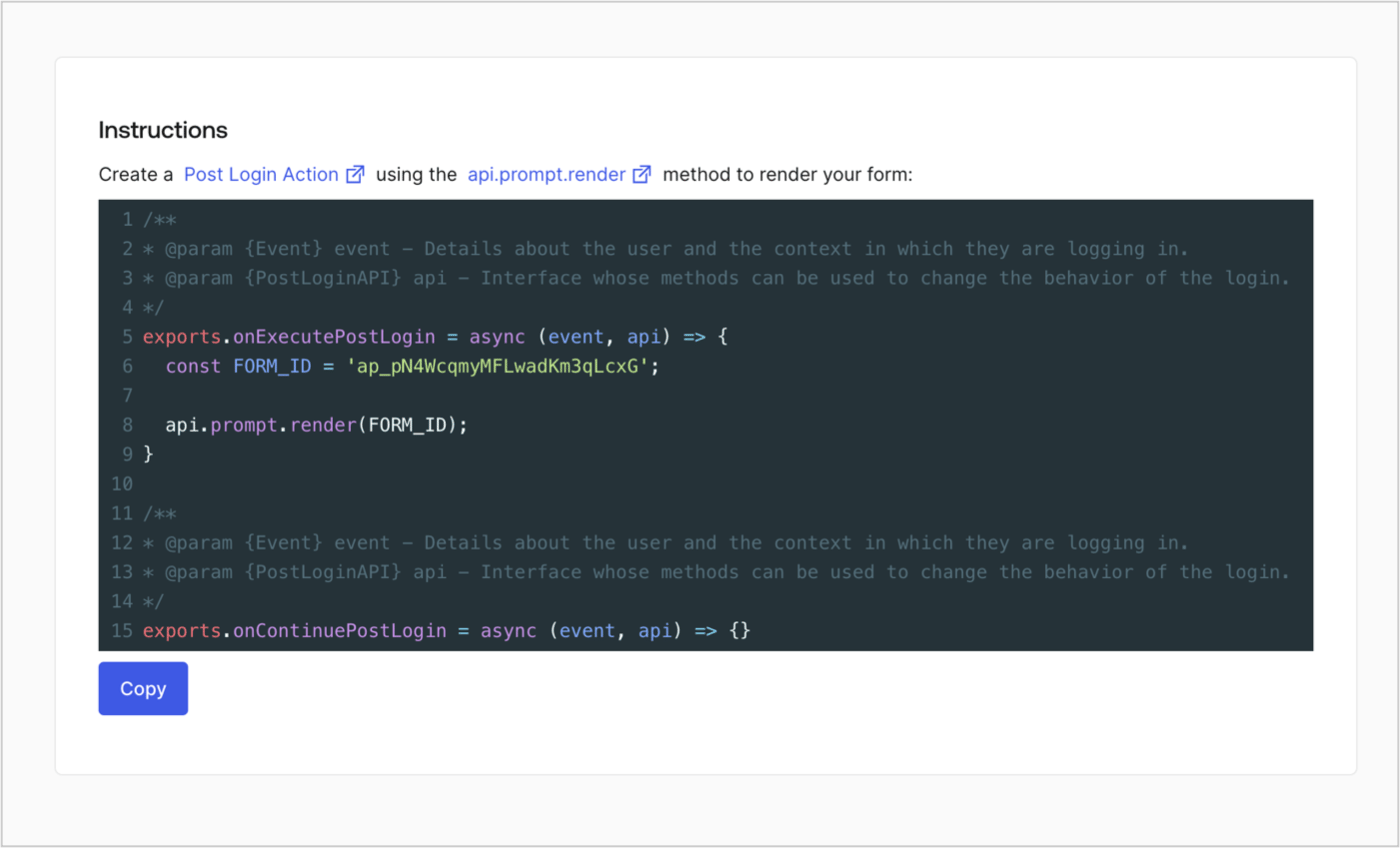
Retrieve your form render code to visually render the form with a custom Post Login Action by following these steps:

* From the Form editor, select **`<> Render`**.
* Select **Copy**.
<Frame>
  <img src="https://mintcdn.com/docs-dev-eval-flywheel-swift-quickstart/NdAtkZidl8E4ezHO/docs/images/cdy7uua7fh8z/2EIUzc539sq9lwoTKbjoJv/496a864c0fc44a782c9cadca119dbfb0/embed.png?fit=max&auto=format&n=NdAtkZidl8E4ezHO&q=85&s=e1502b2c06dc446a29d2783ec158e57c" alt="Dashboard > Actions > Forms > Form > Embed" data-og-width="1400" width="1400" data-og-height="848" height="848" data-path="docs/images/cdy7uua7fh8z/2EIUzc539sq9lwoTKbjoJv/496a864c0fc44a782c9cadca119dbfb0/embed.png" data-optimize="true" data-opv="3" srcset="https://mintcdn.com/docs-dev-eval-flywheel-swift-quickstart/NdAtkZidl8E4ezHO/docs/images/cdy7uua7fh8z/2EIUzc539sq9lwoTKbjoJv/496a864c0fc44a782c9cadca119dbfb0/embed.png?w=280&fit=max&auto=format&n=NdAtkZidl8E4ezHO&q=85&s=6bc7f1e21965f79a14e9d686027bda25 280w, https://mintcdn.com/docs-dev-eval-flywheel-swift-quickstart/NdAtkZidl8E4ezHO/docs/images/cdy7uua7fh8z/2EIUzc539sq9lwoTKbjoJv/496a864c0fc44a782c9cadca119dbfb0/embed.png?w=560&fit=max&auto=format&n=NdAtkZidl8E4ezHO&q=85&s=45ee41eac40f3f5fb9ccc3f5d31d89b5 560w, https://mintcdn.com/docs-dev-eval-flywheel-swift-quickstart/NdAtkZidl8E4ezHO/docs/images/cdy7uua7fh8z/2EIUzc539sq9lwoTKbjoJv/496a864c0fc44a782c9cadca119dbfb0/embed.png?w=840&fit=max&auto=format&n=NdAtkZidl8E4ezHO&q=85&s=928451abf08efc0fc942dcd6deaffada 840w, https://mintcdn.com/docs-dev-eval-flywheel-swift-quickstart/NdAtkZidl8E4ezHO/docs/images/cdy7uua7fh8z/2EIUzc539sq9lwoTKbjoJv/496a864c0fc44a782c9cadca119dbfb0/embed.png?w=1100&fit=max&auto=format&n=NdAtkZidl8E4ezHO&q=85&s=b19c32d508cc11c10932c32158bfacfb 1100w, https://mintcdn.com/docs-dev-eval-flywheel-swift-quickstart/NdAtkZidl8E4ezHO/docs/images/cdy7uua7fh8z/2EIUzc539sq9lwoTKbjoJv/496a864c0fc44a782c9cadca119dbfb0/embed.png?w=1650&fit=max&auto=format&n=NdAtkZidl8E4ezHO&q=85&s=d3afa0c8ac58e1fe66fbfc39b4c76b5b 1650w, https://mintcdn.com/docs-dev-eval-flywheel-swift-quickstart/NdAtkZidl8E4ezHO/docs/images/cdy7uua7fh8z/2EIUzc539sq9lwoTKbjoJv/496a864c0fc44a782c9cadca119dbfb0/embed.png?w=2500&fit=max&auto=format&n=NdAtkZidl8E4ezHO&q=85&s=2e5464c945f2bc34073ef2e16ab84502 2500w" />
</Frame>

## Create a Post Login Action

Create a post-login Action to render your form by following these steps:

1. Navigate to **Auth0 Dashboard > Actions > Flows > Login.**
2. Select the **+** icon and Select **Build from scratch**:

   * **Name**: Enter `Render Update Policy Form`.
   * **Trigger**: Select `Login / Post Login`.
   * **Runtime**: Select the recommended version.
3. Select **Create**.

To configure the post-login Action:

1. Delete the existing code from the Code editor.
2. Paste the form render code into the Code editor.
3. Edit the code to define the conditional logic that will render the form.

   ```javascript lines theme={null}
   /**
   * @param {Event} event - Details about the user and the context in which they are logging in.
   * @param {PostLoginAPI} api - Interface whose methods can be used to change the behavior of the login.
   */
   exports.onExecutePostLogin = async (event, api) => {
     const FORM_ID = 'REPLACE_WITH_YOUR_FORM_ID';

     if (event.user.app_metadata.privacy_policies !== true) {
       api.prompt.render(FORM_ID);
     }
   }

   exports.onContinuePostLogin = async (event, api) => { }
   ```

   <Callout icon="file-lines" color="#0EA5E9" iconType="regular">
     The example code above will render the form when a user is missing the app metadata `privacy_policies` property.
   </Callout>
4. Select **Deploy.**
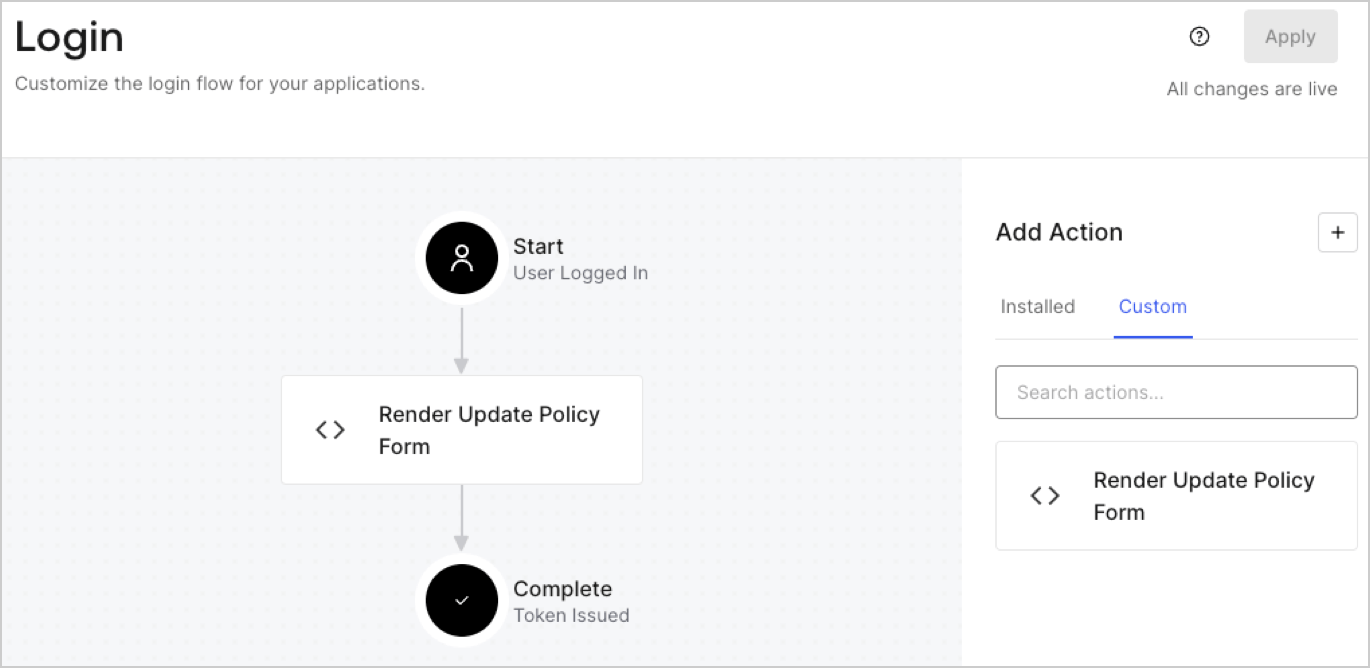
5. Drag and Drop the **Render Update Policy Form** Action to the **Login** flow.
   <Frame>
     <img src="https://mintcdn.com/docs-dev-eval-flywheel-swift-quickstart/TvpCaWfkEviIHXqs/docs/images/cdy7uua7fh8z/5TOwDgevZsBqd7yZynUYWU/41ca909dc3007aed4f40ff794a05efa5/postlogin.png?fit=max&auto=format&n=TvpCaWfkEviIHXqs&q=85&s=d07fe6415c04c8d070e87d8150248f35" alt="Dashboard > Forms > Use Case > Render update policy form login action" data-og-width="1370" width="1370" data-og-height="668" height="668" data-path="docs/images/cdy7uua7fh8z/5TOwDgevZsBqd7yZynUYWU/41ca909dc3007aed4f40ff794a05efa5/postlogin.png" data-optimize="true" data-opv="3" srcset="https://mintcdn.com/docs-dev-eval-flywheel-swift-quickstart/TvpCaWfkEviIHXqs/docs/images/cdy7uua7fh8z/5TOwDgevZsBqd7yZynUYWU/41ca909dc3007aed4f40ff794a05efa5/postlogin.png?w=280&fit=max&auto=format&n=TvpCaWfkEviIHXqs&q=85&s=5cb08e7448fe6030a0f6b31b10f74b4b 280w, https://mintcdn.com/docs-dev-eval-flywheel-swift-quickstart/TvpCaWfkEviIHXqs/docs/images/cdy7uua7fh8z/5TOwDgevZsBqd7yZynUYWU/41ca909dc3007aed4f40ff794a05efa5/postlogin.png?w=560&fit=max&auto=format&n=TvpCaWfkEviIHXqs&q=85&s=fe637eb0b9ab2ed25253c1a787c4d925 560w, https://mintcdn.com/docs-dev-eval-flywheel-swift-quickstart/TvpCaWfkEviIHXqs/docs/images/cdy7uua7fh8z/5TOwDgevZsBqd7yZynUYWU/41ca909dc3007aed4f40ff794a05efa5/postlogin.png?w=840&fit=max&auto=format&n=TvpCaWfkEviIHXqs&q=85&s=8771e85d311f4466daca845a0a03a1af 840w, https://mintcdn.com/docs-dev-eval-flywheel-swift-quickstart/TvpCaWfkEviIHXqs/docs/images/cdy7uua7fh8z/5TOwDgevZsBqd7yZynUYWU/41ca909dc3007aed4f40ff794a05efa5/postlogin.png?w=1100&fit=max&auto=format&n=TvpCaWfkEviIHXqs&q=85&s=407afb9303ca5e40e5179128bf3e4a11 1100w, https://mintcdn.com/docs-dev-eval-flywheel-swift-quickstart/TvpCaWfkEviIHXqs/docs/images/cdy7uua7fh8z/5TOwDgevZsBqd7yZynUYWU/41ca909dc3007aed4f40ff794a05efa5/postlogin.png?w=1650&fit=max&auto=format&n=TvpCaWfkEviIHXqs&q=85&s=546144d01218918a7c6cdbf37f2ffd29 1650w, https://mintcdn.com/docs-dev-eval-flywheel-swift-quickstart/TvpCaWfkEviIHXqs/docs/images/cdy7uua7fh8z/5TOwDgevZsBqd7yZynUYWU/41ca909dc3007aed4f40ff794a05efa5/postlogin.png?w=2500&fit=max&auto=format&n=TvpCaWfkEviIHXqs&q=85&s=7953ba191ad3f780e69adc79f1d06844 2500w" />
   </Frame>
6. Select **Apply.**

### Test implementation

Test the implementation by following these steps:

1. Log in with an existing user whose app`_metadata` attribute `privacy_policies` does not have a value.
2. The post-login Action in the Login flow will render the form and prompt for acceptance.
3. Select **Auth0 Dashboard > User Management > Users,** locate the user and verify that the `app_metadata` attribute `privacy_policies` contains a `true` value and a timestamp.
